Since OAuth2 is the most common authentication type for applications, Composio provides managed auth for most OAuth2 based applications. This is to speed up development and prototyping. This means you don't have to provide your own OAuth credentials.
from composio import Composiocomposio = Composio()# Use composio managed authauth_config = composio.auth_configs.create( toolkit="github", options={ "type": "use_composio_managed_auth", },)print(auth_config)
import { class Composio<TProvider extends BaseComposioProvider<unknown, unknown, unknown> = OpenAIProvider>
This is the core class for Composio.
It is used to initialize the Composio SDK and provide a global configuration.
Creates a new instance of the Composio SDK.
The constructor initializes the SDK with the provided configuration options,
sets up the API client, and initializes all core models (tools, toolkits, etc.).
@paramconfig - Configuration options for the Composio SDK@paramconfig.apiKey - The API key for authenticating with the Composio API@paramconfig.baseURL - The base URL for the Composio API (defaults to production URL)@paramconfig.allowTracking - Whether to allow anonymous usage analytics@paramconfig.provider - The provider to use for this Composio instance (defaults to OpenAIProvider)@example```typescript
// Initialize with default configuration
const composio = new Composio();
// Initialize with custom API key and base URL
const composio = new Composio({
apiKey: 'your-api-key',
baseURL: 'https://api.composio.dev'
});
// Initialize with custom provider
const composio = new Composio({
apiKey: 'your-api-key',
provider: new CustomProvider()
});
```
The `console` module provides a simple debugging console that is similar to the
JavaScript console mechanism provided by web browsers.
The module exports two specific components:
* A `Console` class with methods such as `console.log()`, `console.error()` and `console.warn()` that can be used to write to any Node.js stream.
* A global `console` instance configured to write to [`process.stdout`](https://nodejs.org/docs/latest-v24.x/api/process.html#processstdout) and
[`process.stderr`](https://nodejs.org/docs/latest-v24.x/api/process.html#processstderr). The global `console` can be used without importing the `node:console` module.
_**Warning**_: The global console object's methods are neither consistently
synchronous like the browser APIs they resemble, nor are they consistently
asynchronous like all other Node.js streams. See the [`note on process I/O`](https://nodejs.org/docs/latest-v24.x/api/process.html#a-note-on-process-io) for
more information.
Example using the global `console`:
```js
console.log('hello world');
// Prints: hello world, to stdout
console.log('hello %s', 'world');
// Prints: hello world, to stdout
console.error(new Error('Whoops, something bad happened'));
// Prints error message and stack trace to stderr:
// Error: Whoops, something bad happened
// at [eval]:5:15
// at Script.runInThisContext (node:vm:132:18)
// at Object.runInThisContext (node:vm:309:38)
// at node:internal/process/execution:77:19
// at [eval]-wrapper:6:22
// at evalScript (node:internal/process/execution:76:60)
// at node:internal/main/eval_string:23:3
const name = 'Will Robinson';
console.warn(`Danger ${name}! Danger!`);
// Prints: Danger Will Robinson! Danger!, to stderr
```
Example using the `Console` class:
```js
const out = getStreamSomehow();
const err = getStreamSomehow();
const myConsole = new console.Console(out, err);
myConsole.log('hello world');
// Prints: hello world, to out
myConsole.log('hello %s', 'world');
// Prints: hello world, to out
myConsole.error(new Error('Whoops, something bad happened'));
// Prints: [Error: Whoops, something bad happened], to err
const name = 'Will Robinson';
myConsole.warn(`Danger ${name}! Danger!`);
// Prints: Danger Will Robinson! Danger!, to err
```
Prints to `stdout` with newline. Multiple arguments can be passed, with the
first used as the primary message and all additional used as substitution
values similar to [`printf(3)`](http://man7.org/linux/man-pages/man3/printf.3.html)
(the arguments are all passed to [`util.format()`](https://nodejs.org/docs/latest-v24.x/api/util.html#utilformatformat-args)).
```js
const count = 5;
console.log('count: %d', count);
// Prints: count: 5, to stdout
console.log('count:', count);
// Prints: count: 5, to stdout
```
See [`util.format()`](https://nodejs.org/docs/latest-v24.x/api/util.html#utilformatformat-args) for more information.
The `console` module provides a simple debugging console that is similar to the
JavaScript console mechanism provided by web browsers.
The module exports two specific components:
* A `Console` class with methods such as `console.log()`, `console.error()` and `console.warn()` that can be used to write to any Node.js stream.
* A global `console` instance configured to write to [`process.stdout`](https://nodejs.org/docs/latest-v24.x/api/process.html#processstdout) and
[`process.stderr`](https://nodejs.org/docs/latest-v24.x/api/process.html#processstderr). The global `console` can be used without importing the `node:console` module.
_**Warning**_: The global console object's methods are neither consistently
synchronous like the browser APIs they resemble, nor are they consistently
asynchronous like all other Node.js streams. See the [`note on process I/O`](https://nodejs.org/docs/latest-v24.x/api/process.html#a-note-on-process-io) for
more information.
Example using the global `console`:
```js
console.log('hello world');
// Prints: hello world, to stdout
console.log('hello %s', 'world');
// Prints: hello world, to stdout
console.error(new Error('Whoops, something bad happened'));
// Prints error message and stack trace to stderr:
// Error: Whoops, something bad happened
// at [eval]:5:15
// at Script.runInThisContext (node:vm:132:18)
// at Object.runInThisContext (node:vm:309:38)
// at node:internal/process/execution:77:19
// at [eval]-wrapper:6:22
// at evalScript (node:internal/process/execution:76:60)
// at node:internal/main/eval_string:23:3
const name = 'Will Robinson';
console.warn(`Danger ${name}! Danger!`);
// Prints: Danger Will Robinson! Danger!, to stderr
```
Example using the `Console` class:
```js
const out = getStreamSomehow();
const err = getStreamSomehow();
const myConsole = new console.Console(out, err);
myConsole.log('hello world');
// Prints: hello world, to out
myConsole.log('hello %s', 'world');
// Prints: hello world, to out
myConsole.error(new Error('Whoops, something bad happened'));
// Prints: [Error: Whoops, something bad happened], to err
const name = 'Will Robinson';
myConsole.warn(`Danger ${name}! Danger!`);
// Prints: Danger Will Robinson! Danger!, to err
```
Prints to `stdout` with newline. Multiple arguments can be passed, with the
first used as the primary message and all additional used as substitution
values similar to [`printf(3)`](http://man7.org/linux/man-pages/man3/printf.3.html)
(the arguments are all passed to [`util.format()`](https://nodejs.org/docs/latest-v24.x/api/util.html#utilformatformat-args)).
```js
const count = 5;
console.log('count: %d', count);
// Prints: count: 5, to stdout
console.log('count:', count);
// Prints: count: 5, to stdout
```
See [`util.format()`](https://nodejs.org/docs/latest-v24.x/api/util.html#utilformatformat-args) for more information.
You can specify a custom redirect URI by including the oauth_redirect_uri parameter in the credentials object. If not provided, Composio uses the default redirect URI.
Specifying the authorized redirect URI
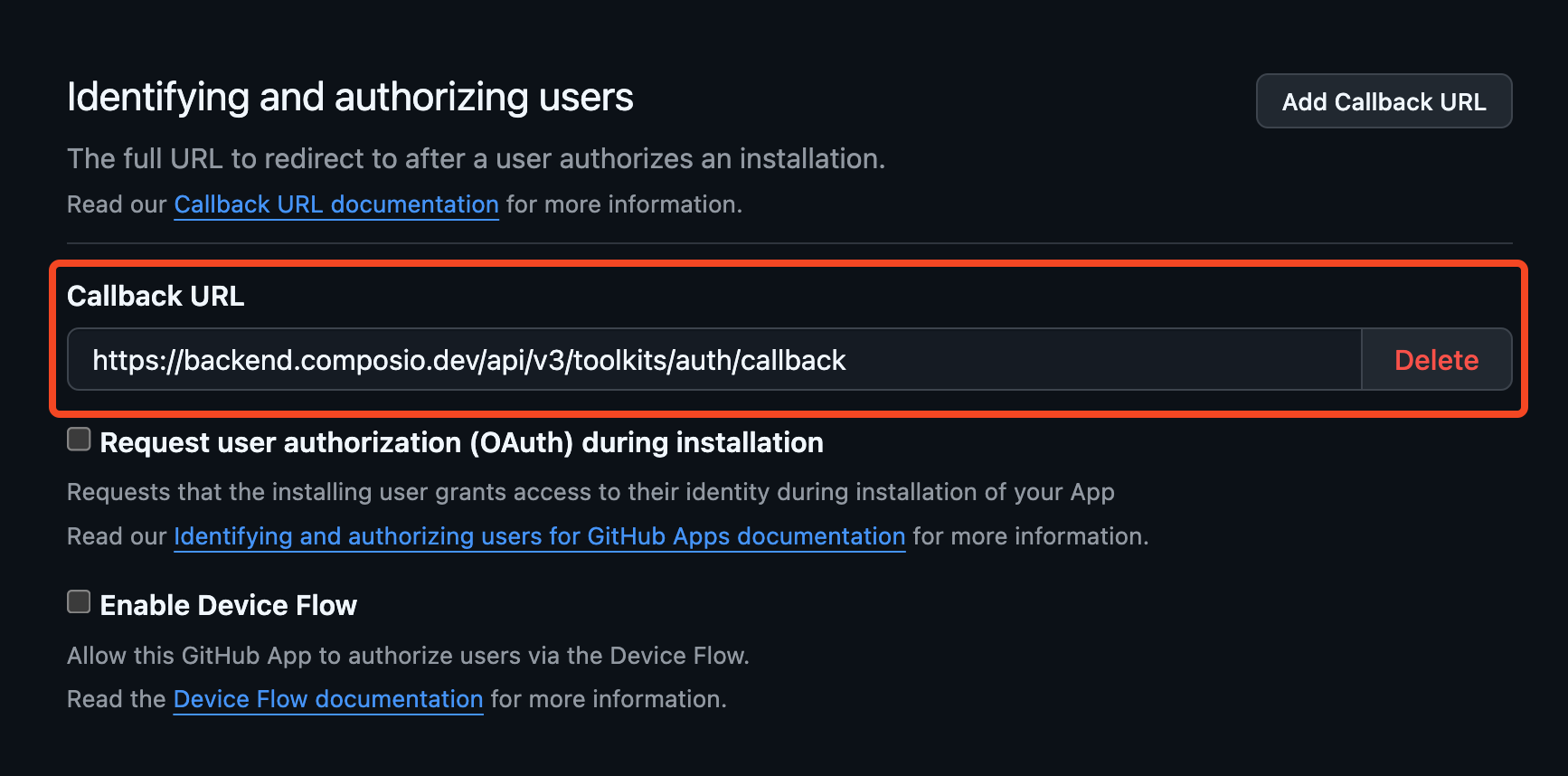
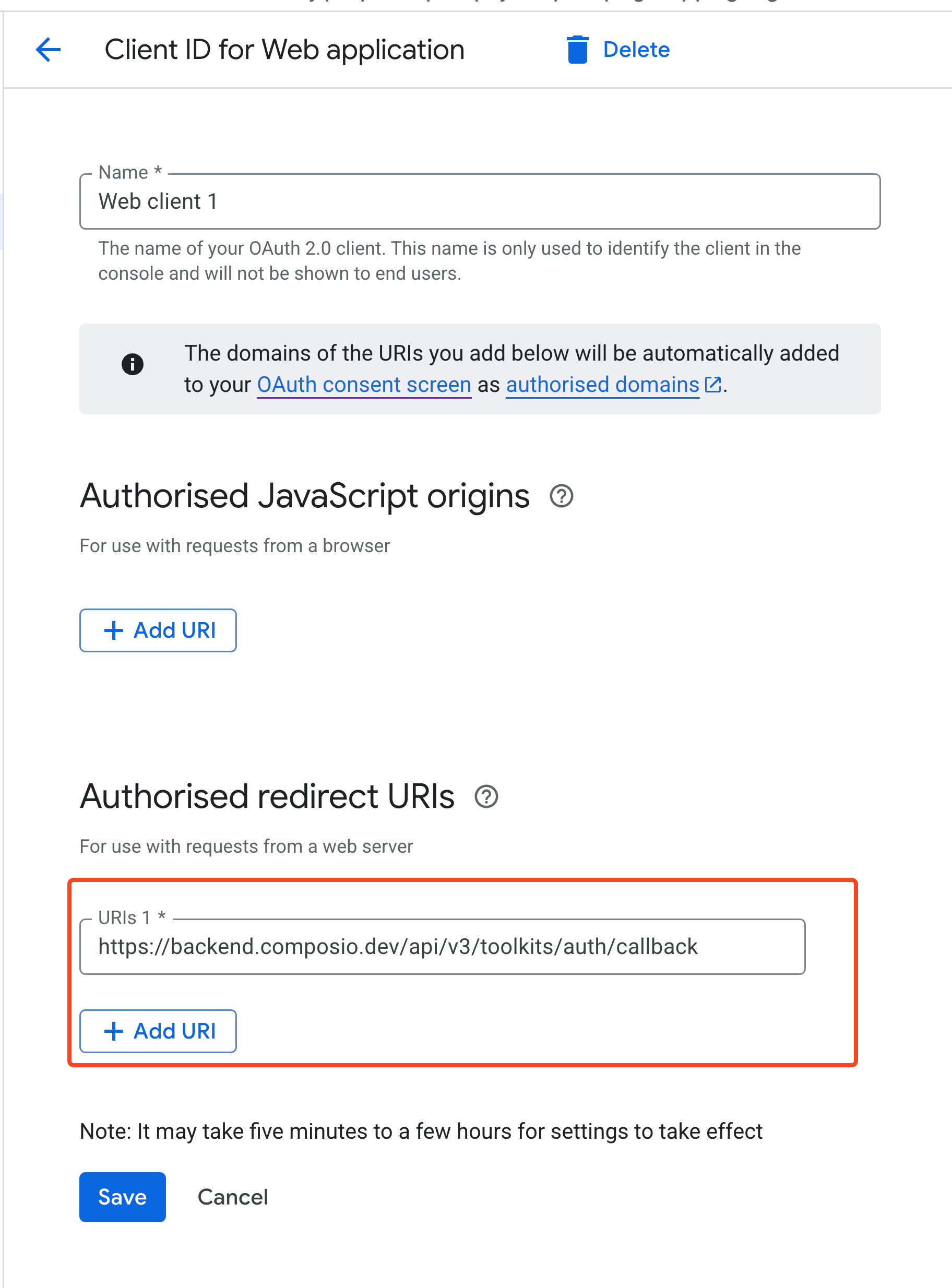
The process of setting up your own OAuth2 credentials usually involves generating a client ID and secret and specifying the authorized redirect URI in the OAuth configuration.
The authorized redirect URI is the URI that captures the OAuth code that is returned to the app.
While doing so, you must ensure to set the authorized redirect URI in the OAuth configuration to:
Composio requests a set of appropriate default OAuth2 scopes for each toolkit wherever possible. However, you can override or modify these scopes by passing a scopes field to the credentials object.
Creates a new instance of the Composio SDK.
The constructor initializes the SDK with the provided configuration options,
sets up the API client, and initializes all core models (tools, toolkits, etc.).
@paramconfig - Configuration options for the Composio SDK@paramconfig.apiKey - The API key for authenticating with the Composio API@paramconfig.baseURL - The base URL for the Composio API (defaults to production URL)@paramconfig.allowTracking - Whether to allow anonymous usage analytics@paramconfig.provider - The provider to use for this Composio instance (defaults to OpenAIProvider)@example```typescript
// Initialize with default configuration
const composio = new Composio();
// Initialize with custom API key and base URL
const composio = new Composio({
apiKey: 'your-api-key',
baseURL: 'https://api.composio.dev'
});
// Initialize with custom provider
const composio = new Composio({
apiKey: 'your-api-key',
provider: new CustomProvider()
});
```
The `console` module provides a simple debugging console that is similar to the
JavaScript console mechanism provided by web browsers.
The module exports two specific components:
* A `Console` class with methods such as `console.log()`, `console.error()` and `console.warn()` that can be used to write to any Node.js stream.
* A global `console` instance configured to write to [`process.stdout`](https://nodejs.org/docs/latest-v24.x/api/process.html#processstdout) and
[`process.stderr`](https://nodejs.org/docs/latest-v24.x/api/process.html#processstderr). The global `console` can be used without importing the `node:console` module.
_**Warning**_: The global console object's methods are neither consistently
synchronous like the browser APIs they resemble, nor are they consistently
asynchronous like all other Node.js streams. See the [`note on process I/O`](https://nodejs.org/docs/latest-v24.x/api/process.html#a-note-on-process-io) for
more information.
Example using the global `console`:
```js
console.log('hello world');
// Prints: hello world, to stdout
console.log('hello %s', 'world');
// Prints: hello world, to stdout
console.error(new Error('Whoops, something bad happened'));
// Prints error message and stack trace to stderr:
// Error: Whoops, something bad happened
// at [eval]:5:15
// at Script.runInThisContext (node:vm:132:18)
// at Object.runInThisContext (node:vm:309:38)
// at node:internal/process/execution:77:19
// at [eval]-wrapper:6:22
// at evalScript (node:internal/process/execution:76:60)
// at node:internal/main/eval_string:23:3
const name = 'Will Robinson';
console.warn(`Danger ${name}! Danger!`);
// Prints: Danger Will Robinson! Danger!, to stderr
```
Example using the `Console` class:
```js
const out = getStreamSomehow();
const err = getStreamSomehow();
const myConsole = new console.Console(out, err);
myConsole.log('hello world');
// Prints: hello world, to out
myConsole.log('hello %s', 'world');
// Prints: hello world, to out
myConsole.error(new Error('Whoops, something bad happened'));
// Prints: [Error: Whoops, something bad happened], to err
const name = 'Will Robinson';
myConsole.warn(`Danger ${name}! Danger!`);
// Prints: Danger Will Robinson! Danger!, to err
```
Prints to `stdout` with newline. Multiple arguments can be passed, with the
first used as the primary message and all additional used as substitution
values similar to [`printf(3)`](http://man7.org/linux/man-pages/man3/printf.3.html)
(the arguments are all passed to [`util.format()`](https://nodejs.org/docs/latest-v24.x/api/util.html#utilformatformat-args)).
```js
const count = 5;
console.log('count: %d', count);
// Prints: count: 5, to stdout
console.log('count:', count);
// Prints: count: 5, to stdout
```
See [`util.format()`](https://nodejs.org/docs/latest-v24.x/api/util.html#utilformatformat-args) for more information.
The `console` module provides a simple debugging console that is similar to the
JavaScript console mechanism provided by web browsers.
The module exports two specific components:
* A `Console` class with methods such as `console.log()`, `console.error()` and `console.warn()` that can be used to write to any Node.js stream.
* A global `console` instance configured to write to [`process.stdout`](https://nodejs.org/docs/latest-v24.x/api/process.html#processstdout) and
[`process.stderr`](https://nodejs.org/docs/latest-v24.x/api/process.html#processstderr). The global `console` can be used without importing the `node:console` module.
_**Warning**_: The global console object's methods are neither consistently
synchronous like the browser APIs they resemble, nor are they consistently
asynchronous like all other Node.js streams. See the [`note on process I/O`](https://nodejs.org/docs/latest-v24.x/api/process.html#a-note-on-process-io) for
more information.
Example using the global `console`:
```js
console.log('hello world');
// Prints: hello world, to stdout
console.log('hello %s', 'world');
// Prints: hello world, to stdout
console.error(new Error('Whoops, something bad happened'));
// Prints error message and stack trace to stderr:
// Error: Whoops, something bad happened
// at [eval]:5:15
// at Script.runInThisContext (node:vm:132:18)
// at Object.runInThisContext (node:vm:309:38)
// at node:internal/process/execution:77:19
// at [eval]-wrapper:6:22
// at evalScript (node:internal/process/execution:76:60)
// at node:internal/main/eval_string:23:3
const name = 'Will Robinson';
console.warn(`Danger ${name}! Danger!`);
// Prints: Danger Will Robinson! Danger!, to stderr
```
Example using the `Console` class:
```js
const out = getStreamSomehow();
const err = getStreamSomehow();
const myConsole = new console.Console(out, err);
myConsole.log('hello world');
// Prints: hello world, to out
myConsole.log('hello %s', 'world');
// Prints: hello world, to out
myConsole.error(new Error('Whoops, something bad happened'));
// Prints: [Error: Whoops, something bad happened], to err
const name = 'Will Robinson';
myConsole.warn(`Danger ${name}! Danger!`);
// Prints: Danger Will Robinson! Danger!, to err
```
Prints to `stdout` with newline. Multiple arguments can be passed, with the
first used as the primary message and all additional used as substitution
values similar to [`printf(3)`](http://man7.org/linux/man-pages/man3/printf.3.html)
(the arguments are all passed to [`util.format()`](https://nodejs.org/docs/latest-v24.x/api/util.html#utilformatformat-args)).
```js
const count = 5;
console.log('count: %d', count);
// Prints: count: 5, to stdout
console.log('count:', count);
// Prints: count: 5, to stdout
```
See [`util.format()`](https://nodejs.org/docs/latest-v24.x/api/util.html#utilformatformat-args) for more information.
In cases where you need to dynamically discover the exact field names and handle different auth schemes programmatically, you can inspect the auth config details first.
Retrieves a specific toolkit by its slug identifier.
@paramslug - The unique slug identifier of the toolkit to retrieve@returnsThe toolkit object with detailed information@throws{ComposioToolNotFoundError} If no toolkit with the given slug exists@example```typescript
// Get a specific toolkit
const githubToolkit = await composio.toolkits.get('github');
console.log(githubToolkit.name); // GitHub
console.log(githubToolkit.authConfigDetails); // Authentication configuration details
```
get("NOTION");// Extract field names from authConfigDetailsconst
Retrieves the fields required for creating an auth config for a toolkit.
@paramtoolkitSlug - The slug of the toolkit to retrieve the fields for@paramauthScheme - The auth scheme to retrieve the fields for@paramoptions.requiredOnly - Whether to only return the required fields@returnsThe fields required for creating an auth config
The `console` module provides a simple debugging console that is similar to the
JavaScript console mechanism provided by web browsers.
The module exports two specific components:
* A `Console` class with methods such as `console.log()`, `console.error()` and `console.warn()` that can be used to write to any Node.js stream.
* A global `console` instance configured to write to [`process.stdout`](https://nodejs.org/docs/latest-v24.x/api/process.html#processstdout) and
[`process.stderr`](https://nodejs.org/docs/latest-v24.x/api/process.html#processstderr). The global `console` can be used without importing the `node:console` module.
_**Warning**_: The global console object's methods are neither consistently
synchronous like the browser APIs they resemble, nor are they consistently
asynchronous like all other Node.js streams. See the [`note on process I/O`](https://nodejs.org/docs/latest-v24.x/api/process.html#a-note-on-process-io) for
more information.
Example using the global `console`:
```js
console.log('hello world');
// Prints: hello world, to stdout
console.log('hello %s', 'world');
// Prints: hello world, to stdout
console.error(new Error('Whoops, something bad happened'));
// Prints error message and stack trace to stderr:
// Error: Whoops, something bad happened
// at [eval]:5:15
// at Script.runInThisContext (node:vm:132:18)
// at Object.runInThisContext (node:vm:309:38)
// at node:internal/process/execution:77:19
// at [eval]-wrapper:6:22
// at evalScript (node:internal/process/execution:76:60)
// at node:internal/main/eval_string:23:3
const name = 'Will Robinson';
console.warn(`Danger ${name}! Danger!`);
// Prints: Danger Will Robinson! Danger!, to stderr
```
Example using the `Console` class:
```js
const out = getStreamSomehow();
const err = getStreamSomehow();
const myConsole = new console.Console(out, err);
myConsole.log('hello world');
// Prints: hello world, to out
myConsole.log('hello %s', 'world');
// Prints: hello world, to out
myConsole.error(new Error('Whoops, something bad happened'));
// Prints: [Error: Whoops, something bad happened], to err
const name = 'Will Robinson';
myConsole.warn(`Danger ${name}! Danger!`);
// Prints: Danger Will Robinson! Danger!, to err
```
Prints to `stdout` with newline. Multiple arguments can be passed, with the
first used as the primary message and all additional used as substitution
values similar to [`printf(3)`](http://man7.org/linux/man-pages/man3/printf.3.html)
(the arguments are all passed to [`util.format()`](https://nodejs.org/docs/latest-v24.x/api/util.html#utilformatformat-args)).
```js
const count = 5;
console.log('count: %d', count);
// Prints: count: 5, to stdout
console.log('count:', count);
// Prints: count: 5, to stdout
```
See [`util.format()`](https://nodejs.org/docs/latest-v24.x/api/util.html#utilformatformat-args) for more information.